
Mind Map
An infinite canvas for the ideas you haven't organised yet — factions, pantheons, plot hooks. Bezier links, nested workspaces, undo/redo.
Dungeon Master Tool is a free, offline-first app for building worlds, running combats and sessions, and playing together across five platforms. Everything runs on your device — online is an option, not a gate.
Session 14 · The Drowned Keep
a three ring binder, one lined paper and the tool
offline ✓ 0
Forever — no tiers
0
Forever — no tiers
01 The tools
Worldbuilding, dungeon mastering and player tools in one free app — fully offline, no account to start.
An infinite canvas for the ideas you haven't organised yet — factions, pantheons, plot hooks. Bezier links, nested workspaces, undo/redo.
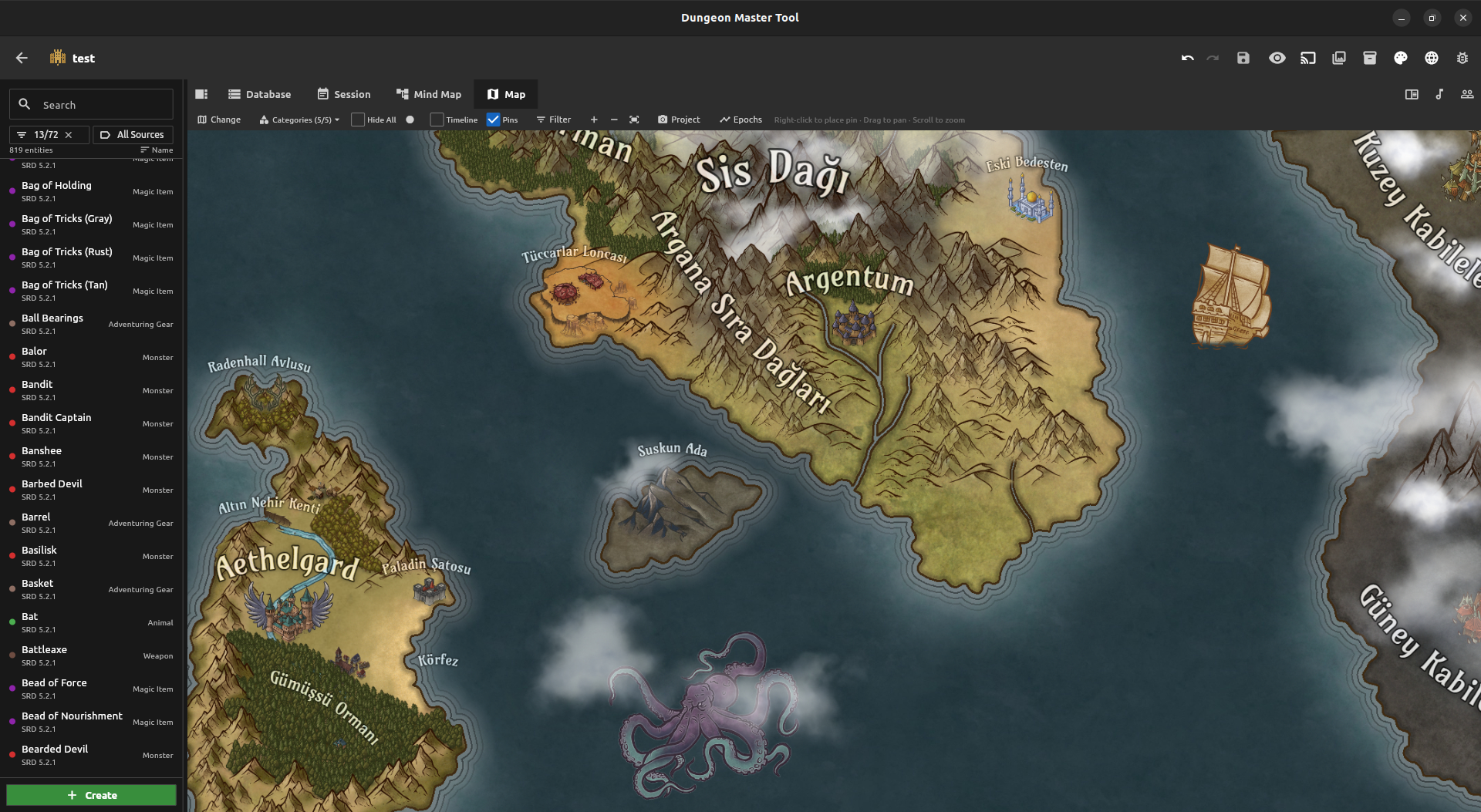
Drop pins on a map image and link them to entities, sessions and events. Every era gets its own map and timeline, and you can hide the parts of the world the party hasn't reached.
Content as one-tap bundles: spell packs, monster lists, treasure sets, whole modules. Import them into any world, export your own, share them on the marketplace.
Run initiative, HP, conditions and turn order on a six-layer canvas — grid, tokens, fog, terrain, decals — with persistent rulers and AoE templates. Every action lands in the session log.
Each world keeps its sessions: notes, timeline events and encounters that survive between games. Pick up exactly where you stopped.
Layered ambient audio with gapless loops and fades. Build a theme for the tavern and one for the dungeon, then crossfade mid-scene.
A wizard that walks you through species, class, background, ability scores and gear. SRD content built in, Open5e packs to extend it.
Join the DM's world, claim a character and play. All features are available from the start — no approvals, no waiting lists.
A private notes field on every character and entity — backstory, plans, reminders. It stays with your world and syncs to your devices.
★ Second Screen
Push battle maps, images, entity cards and PDFs to a pop-out window, an external display, or every connected player's app. You decide exactly what the table sees — and when.
Send the view to a second window on the DM's desktop — its own monitor, free to pan and zoom without touching your work.
Cast the projection to a TV or monitor in the room, so the table gets a screen of its own.
Push the same projection to every connected player's app — at the table or across the world.
★ Local sync — the one people ask about
Move worlds, packages and characters between your own devices over Wi-Fi — no internet, no account, nothing uploaded. Pair with a QR code or IP + PIN, and the transfer happens directly between your machines.
Wi-Fi pairing by QR or IP + PIN between any of your devices.
Nothing is uploaded — the data travels between your own devices.
Worlds, packages and characters — everything you build travels between your devices over Wi-Fi.
02 The quiet stuff
No flashy features — just the decisions that decide whether you keep using a tool.
Run the whole app without an account. Online is an option, not a gate.
Publish a world and players join with a revocable invite code.
Publish worlds, packs and characters as versioned snapshots; profiles, feeds and group chat.
One world, five platforms at the same table — Android, iOS, Windows, Linux, macOS.
Interface, help and content in EN, TR, DE and FR.
No premium tier, no subscriptions. The SRD 5.2.1 and CC-licensed packs ship with the app.
03 Screenshots
No mockups — real screens from the running build.
04 Get started
Free and open source. Pick your platform.
Download the APK and install directly on your device.
Download APK Loading version…You may need to enable "Install from unknown sources" in device settings.
iOS builds are currently unsigned. You'll need Xcode, AltStore, or a similar signing tool to install the app.
Download the latest DungeonMasterTool-iOS.ipa release.
Sideload it with Xcode, AltStore, or another iOS signing service.
App Store distribution is not available yet.
Download, extract, and run. No installation required.
Download Windows .zipExtract the folder and run
dungeon_master_tool.exe
Download and run from terminal.
Download Linux .zipunzip DungeonMasterTool-Linux.zip cd bundle ./dungeon_master_tool
This app is not signed with an Apple Developer account. You'll need to remove the quarantine flag after installing.
Extract the downloaded .zip file.
Drag dungeon_master_tool.app to your Applications folder.
Remove the quarantine flag:
sudo xattr -rd com.apple.quarantine /Applications/dungeon_master_tool.app
Launch from Applications or Launchpad.
For Apple Silicon & Intel Macs.
05 Get in touch
I read every piece of feedback — bug report or feature request, reach out.